
Step 4 - Operating Your Rental Store

This page contains valuable information, videos, guides, FAQ, etc. that you can use for the successful operation of your Starbucks Rental Store. Starbucks is also available to assist with all aspects of operating your Rental Store.
Download the Starbucks Cart Program Guide
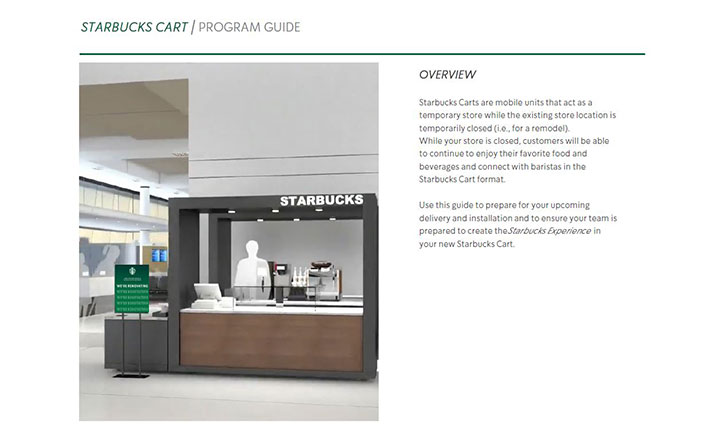
A good start to operating your Starbucks Rental Store is downloading the Starbucks Cart Program Guide above (simply click on the picture above). The FAQ section below contains many topics that you can quickly get answers.
Download the Starbucks Product Assortment
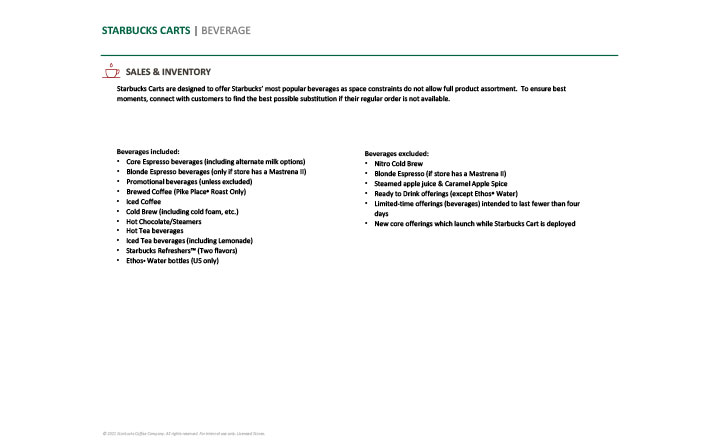
A good start to operating your Starbucks Rental Store is downloading the Starbucks Launch Guide above (simply click on the picture above). The FAQ section below contains many topics that you can quickly get answers.
F.A.Q.
Here are some common questions about Operating your Starbucks Rental Store.
Trouble Shooting
Problems
The Pump for my 5-Gallon Water Bottles is not working?
If you have an Option A (Self-Contained Water/Waste Water) configuration for your Starbucks Rental Store, a Flojet Demand pump (rated for Potable Water) is used to pump the water from your 5-Gallon water. Please note that you would never run this pump dry (i.e. on an empty 5-Gallon water bottle or no water bottle).
If you are having problems with your Flojet pump not working, please do the following (in order):
- Check the light switch located on the lower right wall of the Utility compartment. If it is RED, your Flojet pump is off. Flipping it up with make the red light turn off and your Flojet pump turn on.
- If the light on the light switch (from above) is off. Cycle the switch to the off position (red light on) and back to the on position (red light off).
- With your Flojet pump on (from above), open the cold water faucet on the hand sink. This will release the pressure in the line if it is hydro-locked.
- Make sure the valve at the top of the PIVOT Water Manifold is open along with the corresponding valves for each water line.
If none of the options above worked, you may have a dead Flojet pump. Fear not, your Starbucks Rental Store comes equipped with a backup pump. Please CLICK HERE for a video that will show you how to deploy your backup Flojet pump.
We have fruit flies and a bad smell in the Rental Store?
Fruit flies and a foul smell emanating from your Starbucks Rental Store is directly related to the cleanliness of your Store. In our experience, we have found that if your Store is an Option A (Self-Contained Water/Waste Water), the cleanliness around your Graywater container is probably the culprit.
First and foremost, you must keep your Starbucks Store clean. This means cleaning it during the day and then doing a deep clean every night. You must change out the Graywater container on a regular basis before it overflows. If it overflows, dairy and such will leak into the Utility Compartment and will get everywhere including under and behind the hot water heater. This will make your cleaning job much harder and take much longer. The Graywater container, once emptied, must be cleaned before returning to the Cart. If you put a dirty Graywater Container back in the Store, it will smell and cause fruit flies and bugs to gather.
In Summary:
- Keep your Rental Store clean
- Do a deep clean every night including emptying your Graywater Container – Never leave a Graywater container in the Store overnight without cleaning it.
- When you empty your Graywater container – YOU MUST CLEAN IT before returning it to your Rental Store
- If your Graywater Container overflows into the Utility Compartment, you must do a deep clean including under and around all of the items in there (i.e. hot water heater).
We can always tell when a Store has not been cleaned well during a Rental by the way it returns to PIVOT. Please remember that you will be Charged extra cleaning fees if your Rental Store is returned to PIVOT filthy.
The sinks are backing up?
The Standard B Rental Store contains a Hand Sink and an Espresso Rinser. The Hand Sink should be for HAND WASHING ONLY and is not a dump sink. You can dump LIQUIDS ONLY in the Espresso Rinser.
The Enhanced B2 Store has sinks in both Rear Carts. There is a Hand Sink and Espresso Rinser in the Double Espresso Cart and a Work Sink in the Cold Beverage and Brew Cart. Same as above, the Hand Sink is for HAND WASHING ONLY. You can dump LIQUIDS ONLY in the Espresso Rinser and Work Sink.
Please note that there is NO Garbage Disposal in any of these Carts. Therefore, NO SOLIDS should be dumped down the sinks. If the sinks are clogged, there is a 99.99% chance that solids were dumped down the sink. Liquids rarely clog a sink. You will need to get your plumber to come in and snake the drain to unclog the solids from the sink.
Water is leaking on the countertops?
If you have water leaking on your countertop, there can only be 3 reasons.
- The water connection to the BUNN Brewer is leaking
- The water connection to the Mastrena is leaking.
- Your Operations folks have somehow dumped water or ice on the countertop.
The reason why we say this is that it is highly unlikely that water is leaking up from the Utility Compartment or anything under the countertop.
The cause is most likely that someone has moved the Brewer or Mastrena and the fitting has loosened.
Simply tighten the nut on the end of the Stainless Steel Braided Hose being sure not to over-tighten this fitting. If you are unsure how to do this, have your plumber or maintenance personnel do this for you.
Water is coming out from under the Ice Bin?
If you have water coming out from the Compartment under the Ice Bin, there is a good likely hood that the hose that drains the leaching water from the Ice Bin to the Condensate Pump has somehow pulled out.
Simply open the Compartment door and locate the hose directly under the Ice Bin. This hose should terminate into the Condensate Pump (there is a hole on the top of this pump that the hose is inserted). If the hose in not inserted in this hose, please re-insert it.
If the hose is inserted and water is leaking out of that hole, the Condensate Pump may have lost power. Please check that the Condensate Pump is plugged in and that the outlet has power.
If the hose is inserted in the Condensate Pump and the pump has power – Please Contact PIVOT at starbucksrental@pivotcorp.com for assistance.
Setting Up my Store
How do I get Menus for my Rental Store?
Your Starbucks Rental Store typically has a limited menu in comparison to your permanent Starbucks Store. As such, the Menu displayed should only contain the items available at your Starbuck Rental Store. Please download the Starbucks Product Assortment document above.
Your Starbucks Rental Store contains Menu Boards that you can use to display your Menus. These boards require NO tools to update. Simply un-hang the board from its bracket (mounted into the side wall), slide your menu into the Menu Board and re-hang the Menu Board on the bracket.
If you are unsure of what to put on your menu, appropriate menu forms and sizing – Please contact your Starbucks Representative.
How do I setup my POS?
Your POS should be setup on the left side of the POS1 Cart (for the Standard B Rental Store) and the left and right side of the POS3 Cart (for the Enhanced B2 Rental Store). We recommend that you plug in an outlet strip into the receptacle in the PIVOT Power Distribution Module (the box mounted under the countertop with the illuminated Green toggle switches – the receptacles are located in the back). Your POS equipment can then be plugged into this outlet strip. Please remember to have the Green toggle switch ON (ON is lighted).
To install a data line (i.e. CAT5) into the POS Carts – Simply run the line through the cord cover that is installed between the front and rear Carts containing the extension cord, underneath the POS Cart and up through one of the 2 inches holes in the baseplate in to the compartment below where you would install the POS (where the extension cord is plugged into).
Operating my Store
How will my shirts ship?
Maecenas eu placerat ante. Fusce ut neque justo, et aliquet enim. In hac habitasse platea dictumst. Nullam commodo neque erat, vitae facilisis erat. Cras at mauris ut tortor vestibulum fringilla vel sed metus. Donec interdum purus a justo feugiat rutrum. Sed ac neque ut neque dictum accumsan. Cras lacinia rutrum risus, id viverra metus dictum sit amet.
Fusce venenatis, urna eget cursus placerat, dui nisl fringilla purus, nec tincidunt sapien justo ut nisl. Curabitur lobortis semper neque et varius. Etiam eget lectus risus, a varius orci. Nam placerat mauris at dolor imperdiet at aliquet lectus ultricies.
Duis tincidunt mi at quam condimentum lobortis.
Can you deliver my shirts if I am local?
Maecenas eu placerat ante. Fusce ut neque justo, et aliquet enim. In hac habitasse platea dictumst. Nullam commodo neque erat, vitae facilisis erat. Cras at mauris ut tortor vestibulum fringilla vel sed metus. Donec interdum purus a justo feugiat rutrum. Sed ac neque ut neque dictum accumsan. Cras lacinia rutrum risus, id viverra metus dictum sit amet.
Fusce venenatis, urna eget cursus placerat, dui nisl fringilla purus, nec tincidunt sapien justo ut nisl. Curabitur lobortis semper neque et varius. Etiam eget lectus risus, a varius orci. Nam placerat mauris at dolor imperdiet at aliquet lectus ultricies.
Duis tincidunt mi at quam condimentum lobortis.
Can I come pick up my shirts?
Maecenas eu placerat ante. Fusce ut neque justo, et aliquet enim. In hac habitasse platea dictumst. Nullam commodo neque erat, vitae facilisis erat. Cras at mauris ut tortor vestibulum fringilla vel sed metus. Donec interdum purus a justo feugiat rutrum. Sed ac neque ut neque dictum accumsan. Cras lacinia rutrum risus, id viverra metus dictum sit amet.
Fusce venenatis, urna eget cursus placerat, dui nisl fringilla purus, nec tincidunt sapien justo ut nisl. Curabitur lobortis semper neque et varius. Etiam eget lectus risus, a varius orci. Nam placerat mauris at dolor imperdiet at aliquet lectus ultricies.
Duis tincidunt mi at quam condimentum lobortis.
Can you ship internationally?
Maecenas eu placerat ante. Fusce ut neque justo, et aliquet enim. In hac habitasse platea dictumst. Nullam commodo neque erat, vitae facilisis erat. Cras at mauris ut tortor vestibulum fringilla vel sed metus. Donec interdum purus a justo feugiat rutrum. Sed ac neque ut neque dictum accumsan. Cras lacinia rutrum risus, id viverra metus dictum sit amet.
Fusce venenatis, urna eget cursus placerat, dui nisl fringilla purus, nec tincidunt sapien justo ut nisl. Curabitur lobortis semper neque et varius. Etiam eget lectus risus, a varius orci. Nam placerat mauris at dolor imperdiet at aliquet lectus ultricies.
Duis tincidunt mi at quam condimentum lobortis.
Menu Offering
How much do I have to pay to get started?
Maecenas eu placerat ante. Fusce ut neque justo, et aliquet enim. In hac habitasse platea dictumst. Nullam commodo neque erat, vitae facilisis erat. Cras at mauris ut tortor vestibulum fringilla vel sed metus. Donec interdum purus a justo feugiat rutrum. Sed ac neque ut neque dictum accumsan. Cras lacinia rutrum risus, id viverra metus dictum sit amet.
Fusce venenatis, urna eget cursus placerat, dui nisl fringilla purus, nec tincidunt sapien justo ut nisl. Curabitur lobortis semper neque et varius. Etiam eget lectus risus, a varius orci. Nam placerat mauris at dolor imperdiet at aliquet lectus ultricies.
Duis tincidunt mi at quam condimentum lobortis.
What is the 3% under allowance policy?
Maecenas eu placerat ante. Fusce ut neque justo, et aliquet enim. In hac habitasse platea dictumst. Nullam commodo neque erat, vitae facilisis erat. Cras at mauris ut tortor vestibulum fringilla vel sed metus. Donec interdum purus a justo feugiat rutrum. Sed ac neque ut neque dictum accumsan. Cras lacinia rutrum risus, id viverra metus dictum sit amet.
Fusce venenatis, urna eget cursus placerat, dui nisl fringilla purus, nec tincidunt sapien justo ut nisl. Curabitur lobortis semper neque et varius. Etiam eget lectus risus, a varius orci. Nam placerat mauris at dolor imperdiet at aliquet lectus ultricies.
Duis tincidunt mi at quam condimentum lobortis.
How do I go about making payment?
Maecenas eu placerat ante. Fusce ut neque justo, et aliquet enim. In hac habitasse platea dictumst. Nullam commodo neque erat, vitae facilisis erat. Cras at mauris ut tortor vestibulum fringilla vel sed metus. Donec interdum purus a justo feugiat rutrum. Sed ac neque ut neque dictum accumsan. Cras lacinia rutrum risus, id viverra metus dictum sit amet.
Fusce venenatis, urna eget cursus placerat, dui nisl fringilla purus, nec tincidunt sapien justo ut nisl. Curabitur lobortis semper neque et varius. Etiam eget lectus risus, a varius orci. Nam placerat mauris at dolor imperdiet at aliquet lectus ultricies.
Duis tincidunt mi at quam condimentum lobortis.
Still need help? Contact Us!
For any other questions, please write us at starbucksrental@pivotcorp.com or call us on (404) 671-9325 and Press 2